
Interrupting my communications series, I’d like to blog about a common misconception regarding SQL Server Backups. The mythical Incremental backup. This is part of a month series called T-SQL Tuesdays, the latest of which can be found at: http://sankarreddy.com/2010/10/invitation-to-participate-in-t-sql-tuesday-11-misconceptions-in-sql-server/
The theory is this: Full backups record the entire database. Differentials record the changes since the last Full backup. Transaction logs backups record the log files and Incrementals record the changes since the last Incremental or Full backup, whichever is most recent.
Only one problem with this theory. If you go back to any version of SQL Server, search Books Online or try to backup a database from the GUI, there is no option for the Incremental.
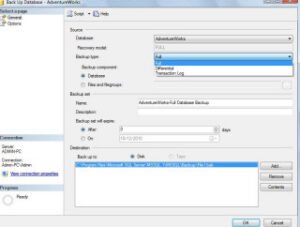
It’s easy to understand how this one got started. Microsoft database certification paths offered Windows Operating Systems (OS) exams as one of the options to being a certified MCDBA. The OS actually does have an Incremental backup file, which makes restoring similar to restoring a SQL Server database with transaction log backups. In the confusion, however, many a DBA got themselves mixed up, confused, and started misusing the term “Incremental” to refer to Transaction Log backups.
Googling “SQL Server Incremental” comes up with many misleading articles and blogs, making it difficult for inexperienced DBAs to get the correct information. To straighten things out, let’s start with the basics, which can also be found in Books Online.
Full Backup – backs up the entire database data file. Does not backup or truncate the transaction log.
Differential (full) Backup – backs up the changes made in the database data file. Does not backup or truncate the transaction log file.
Partial Backup – new to SQL 2005 & up, this backs up the entire Primary filegroup, every Read/Write filegroup, and any Read Only files or filegroups specified by the user. If the database is set as Read-Only, only the Primary filegroup is backed up.
Differential (partial) Backup – new to SQL 2005 & up, this backs up only the data extents changed since the last Partial backup and uses the same rules as the “regular” Partial backup.
File Backups – backs up all the data in specified files or filegroups.
Differential (file) Backup – usual definition of Differential applied to File Backups.
Copy Only Backup – new to SQL 2005 & up, this is a Full backup of a database that occurs outside the normal backup chain. This is great for restoring down to Dev or QC servers without interfering with your normal backup processes.
Transaction Log Backups – erroneously referred to as Incremental Backups, this backs up the database Transaction Logs when the database is in Full or Bulk-Logged Recovery mode. These backups can be used for Point-in-Time restores (Full Recovery) or non-P.I.T. restores after the last Full or Differential backup. Backing up the Transaction Log also checkpoints it, truncates it, and helps prevent unnecessary log file growth.
I recently submitted a trivia question to SQLServerCentral.com about Backup Types. The number of people who still believe the Myth of Incremental is staggering. I hope this article clears the air about this particular issue. As always, please feel free to comment.